
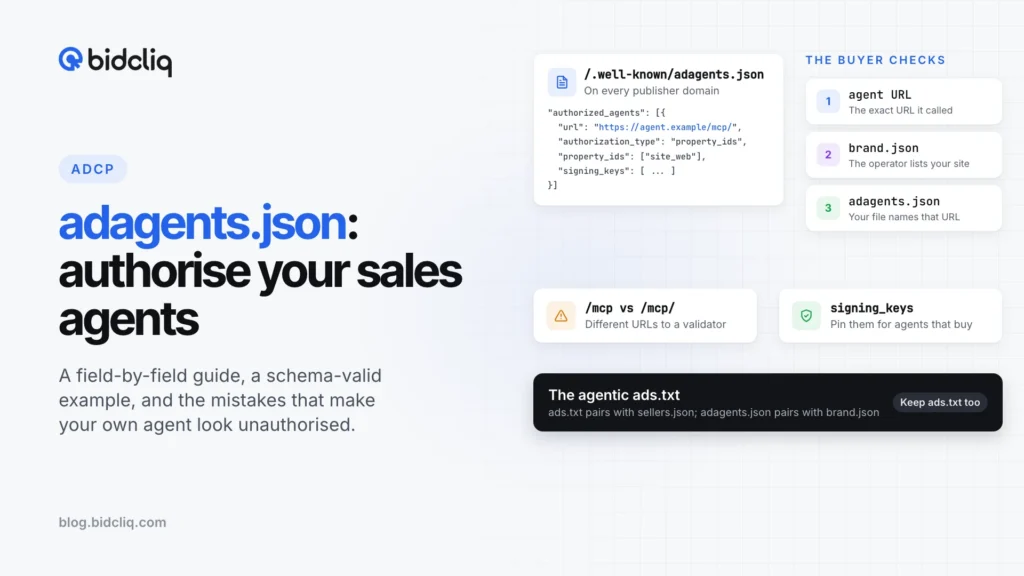
adagents.json: how to authorise AI sales agents on your domains

adagents.json is the file a buyer agent reads to decide whether the sales agent it is talking to may sell your inventory. If it is missing, mis-scoped or served from the wrong URL, a buyer agent cannot verify your own sales agent. This guide covers what the file declares, every field that matters, a schema-valid example for a publisher with three sites and two agents, how buyers check it, and how to validate it, against AdCP 3.2.8 (released 28 October 2026).
For where this file fits in the wider job of getting inventory ready for agents, start with making your inventory agent-ready for AdCP.
What does adagents.json declare?
Three things, in one public JSON file per publisher domain:
- Your properties. Websites, apps, CTV apps and other property types, each with identifiers such as a domain or an Android package.
- Which sales agents may sell them. Each entry names an agent endpoint and the slice of inventory it covers.
- How each path works. Direct, delegated or ad network, plus optional limits by placement, country, date window and exclusivity.
The file can also carry a public placement catalogue, collections (series, shows, podcasts), a format catalogue, data signals and governance vendors under property_features. Everything in it is public, so the spec says to keep raw ad server IDs and delivery mappings out of it.
Where does the file live?
At https://yourdomain/.well-known/adagents.json, as valid UTF-8 JSON with a 200 response.
Redirect rules are strict. Validators follow redirects from the well-known URL only when every hop stays on HTTPS and on the same registrable domain, and they stop after 3 hops. If example.com redirects to www.example.com, the www URL must return the file with a 200.
A file comes in one of two forms:
- Inline: the full structure.
authorized_agentsis the only required top-level field. - Pointer: a small file with
authoritative_location, an HTTPS URL to the full file. Only one hop is allowed, the target cannot itself be a pointer, and validators refuse any redirect on that URL.
A pointer is how a publisher with many domains keeps one source of truth.
Which fields matter?
contact is optional, but if present it needs name. Add email, domain and seller_id, your seller ID from sellers.json, which ties the agentic and programmatic records together.
properties[] entries require property_type, name and identifiers. Add property_id so agents can reference it, and publisher_domain when one file covers several domains.
authorized_agents[] entries require:
url: the agent’s protocol endpoint, path included.authorized_for: a human-readable description, up to 500 characters.authorization_typeplus its selector:property_idsorproperty_tags(pointing into yourproperties[]),inline_properties(whose selector field isproperties, the one name that doesn’t match), orpublisher_properties(for agents selling many publishers).
The optional qualifiers narrow scope:
delegation_type:direct,delegatedorad_network.countries: ISO 3166-1 alpha-2 codes in upper case.effective_fromandeffective_until: a time window.exclusive: true when this agent is your only path for that slice.placement_ids,placement_tagsandcollections: narrower than a whole property.signing_keys: the public keys this agent may sign with.
That last one is easy to skip because the schema marks it optional. The spec text says publishers MUST populate signing_keys for any agent whose scope includes mutating tasks: create_media_buy, update_media_buy, sync_creatives and update_performance_index. A buyer verifying a signed webhook then rejects any key ID not in your pinned set.
A complete example for a three-site publisher
Example Media Group runs three sites. It sells direct through its own sales agent, which serves MCP and A2A at separate URLs. It also lets a partner sell Cricket Desk to buyers in three overseas markets for one season.
The full file, hosted at https://www.dailyledger.example/.well-known/adagents.json:
{
  "$schema": "https://adcontextprotocol.org/schemas/3.2.8/adagents.json",
  "contact": {
    "name": "Example Media Group Ad Operations",
    "email": "adops@dailyledger.example",
    "domain": "dailyledger.example",
    "seller_id": "EMG-1001"
  },
  "properties": [
    {
      "property_id": "dailyledger_web",
      "property_type": "website",
      "name": "The Daily Ledger",
      "identifiers": [{ "type": "domain", "value": "dailyledger.example" }],
      "publisher_domain": "dailyledger.example",
      "supported_channels": ["display", "olv"],
      "tags": ["news"]
    },
    {
      "property_id": "cricketdesk_web",
      "property_type": "website",
      "name": "Cricket Desk",
      "identifiers": [{ "type": "domain", "value": "cricketdesk.example" }],
      "publisher_domain": "cricketdesk.example",
      "supported_channels": ["display", "olv"],
      "tags": ["sport"]
    },
    {
      "property_id": "moneypulse_web",
      "property_type": "website",
      "name": "Money Pulse",
      "identifiers": [{ "type": "domain", "value": "moneypulse.example" }],
      "publisher_domain": "moneypulse.example",
      "supported_channels": ["display"],
      "tags": ["business"]
    }
  ],
  "tags": {
    "news": { "name": "News", "description": "General news sites" },
    "sport": { "name": "Sport", "description": "Sports news and live scores" },
    "business": { "name": "Business", "description": "Markets and personal finance" }
  },
  "authorized_agents": [
    {
      "url": "https://sales.dailyledger.example/mcp/",
      "authorized_for": "Direct-sold display and video across all group sites (MCP endpoint)",
      "authorization_type": "property_ids",
      "property_ids": ["dailyledger_web", "cricketdesk_web", "moneypulse_web"],
      "delegation_type": "direct",
      "signing_keys": [
        {
          "kid": "emg-sales-2026-10",
          "kty": "OKP",
          "alg": "EdDSA",
          "crv": "Ed25519",
          "use": "sig",
          "x": "REPLACE_WITH_PUBLIC_KEY_FROM_AGENT_JWKS"
        }
      ]
    },
    {
      "url": "https://sales.dailyledger.example/a2a",
      "authorized_for": "Direct-sold display and video across all group sites (A2A endpoint)",
      "authorization_type": "property_ids",
      "property_ids": ["dailyledger_web", "cricketdesk_web", "moneypulse_web"],
      "delegation_type": "direct",
      "signing_keys": [
        {
          "kid": "emg-sales-2026-10",
          "kty": "OKP",
          "alg": "EdDSA",
          "crv": "Ed25519",
          "use": "sig",
          "x": "REPLACE_WITH_PUBLIC_KEY_FROM_AGENT_JWKS"
        }
      ]
    },
    {
      "url": "https://agent.globalsports-sales.example/mcp",
      "authorized_for": "Cricket Desk sponsorships sold to buyers outside India, 2026-27 season",
      "authorization_type": "property_ids",
      "property_ids": ["cricketdesk_web"],
      "delegation_type": "delegated",
      "countries": ["GB", "AE", "AU"],
      "effective_from": "2026-11-01T00:00:00Z",
      "effective_until": "2027-04-30T23:59:59Z",
      "exclusive": false,
      "signing_keys": [
        {
          "kid": "gss-sell-2026",
          "kty": "OKP",
          "alg": "EdDSA",
          "crv": "Ed25519",
          "use": "sig",
          "x": "REPLACE_WITH_PUBLIC_KEY_FROM_PARTNER"
        }
      ]
    }
  ],
  "last_updated": "2026-10-29T09:00:00Z"
}
The pointer file on cricketdesk.example and moneypulse.example:
{
  "$schema": "https://adcontextprotocol.org/schemas/3.2.8/adagents.json",
  "authoritative_location": "https://www.dailyledger.example/.well-known/adagents.json",
  "last_updated": "2026-10-29T09:00:00Z"
}
Both files validate against the 3.2.8 schema. Before you publish, replace the x values with the real public keys from each agent’s JWKS. Notes on the choices:
- Two entries for one agent. The spec matches agents by endpoint URL, so an agent with separate MCP and A2A URLs needs one entry each.
- The trailing slash is deliberate. The Prebid Sales Agent’s docs give its MCP endpoint as
/mcp/. Under the spec’s canonical matching,/mcpand/mcp/are different URLs. Copy the exact URL your agent operator gives you. publisher_domainon each property makes a shared file unambiguous about which domain each property belongs to.- The partner entry is narrow on purpose: one property, three countries, one season,
delegated, not exclusive.
How does a buyer agent check it?
The AdCP seller verification walkthrough describes a chain:
- Anchor on the agent URL the buyer actually called over HTTPS.
- Read the operator’s brand.json at
/.well-known/brand.jsonon the operator’s domain. The agent URL must match exactly oneagents[]entry, and the operator lists the properties it claims, each with arelationship. - Read your adagents.json. The same URL must appear in
authorized_agents[], the property must be in scope, anddelegation_typeshould match the operator’srelationship. - Verify webhooks against the keys you pinned in
signing_keys.
Domain identifiers follow web conventions. example.com covers www.example.com and m.example.com, but other subdomains need their own entry, and *.example.com covers all subdomains but not the base domain.
Buyers cache the file. The spec suggests at least 24 hours for ordinary files, and for authoritative files reached through a pointer it caps cache life at 7 days from the last successful fetch. Treat changes as slow to propagate.
How does it relate to ads.txt and sellers.json?
The AdCP docs map the two files onto the programmatic pair:
| Programmatic | AdCP equivalent | Published by | What it says |
|---|---|---|---|
| ads.txt | adagents.json | Publisher | These agents may sell my inventory, on these terms |
| sellers.json | brand.json properties with relationship | Seller or operator | I sell for these publishers, in this way |
ads.txt says a seller is on your list and whether the relationship is DIRECT or RESELLER. It cannot scope by property, placement, country or date, which is what adagents.json adds. Keep ads.txt: your programmatic demand still depends on it.
There is one bridge. If your well-known URL returns a 404 (or an S3-style 403 AccessDenied), validators MAY read the MANAGERDOMAIN line in your ads.txt and check that manager’s adagents.json, one hop only. A #noagents comment on that line opts out. The spec calls this a legacy fallback; new deployments should use authoritative_location.
Common mistakes
- Shortening the agent URL to a host.
https://agent.example.comdoes not matchhttps://agent.example.com/mcp. - One entry for an agent with two endpoints. A buyer connecting to the unlisted URL fails the check.
- Leaving out
signing_keyson an agent that can create or change buys. - A redirect on the authoritative URL. Point
authoritative_locationat the final URL, which must return a 200 directly. - Wrong content type or an HTML error page. The spec’s troubleshooting notes that validators reject
text/htmlortext/plain, even with valid JSON. Serveapplication/json. - Forgetting a domain. Every publisher domain needs its own well-known file, even if it is only a pointer.
- Moving
last_updatedbackwards. For authoritative files, validators treat an older timestamp than the cached one as invalid. - Lower-case country codes. The schema pattern is two upper-case letters.
How do you validate it?
- The AdAgents.json Builder at agenticadvertising.org/adagents/builder fetches your live file, validates it against the schema and checks that agent endpoints respond. It can also generate a file.
- The JSON schema at
https://adcontextprotocol.org/schemas/3.2.8/adagents.jsonis draft-07. Run any draft-07 validator in CI before each deploy. - The Python SDK (
adcp9.3.0 on PyPI, which targets AdCP 3.2.7) providesfetch_adagentsandvalidate_adagents. Before you rely on any helper to test an agent’s scope, check that it appliesproperty_idsandproperty_tagsscoping and treats trailing slashes as significant, as the spec does. - curl for the basics:
curl -sI https://yourdomain/.well-known/adagents.jsonshould show a 200 andapplication/json.
The spec also documents a validation API at adcontextprotocol.org/api/adagents/validate. For a one-off check of a live file, the Builder is the simpler route.
Checklist
- List every publisher domain and app you own, and give each property an ID.
- Get the exact endpoint URLs from each agent operator, MCP and A2A separately.
- Write one entry per URL, with
delegation_typeand the narrowest scope that fits the deal. - Pin
signing_keysfor every agent that can create or change buys. - Host the full file once, and put a pointer or a full copy on every other domain.
- Check redirects, the 200 status and
application/jsonon every domain. - Validate in the Builder and against the schema, then re-check after every change.
- Ask each operator to confirm their brand.json lists your properties with a matching relationship.
At BidCliq we run a sales agent that AgenticAdvertising.org has verified against AdCP 3.1. If you are deploying the open-source option, our guide to running the Prebid Sales Agent covers the agent side.
Frequently asked questions
Where does adagents.json go?
At https://yourdomain/.well-known/adagents.json, served as UTF-8 JSON with a 200 status. Every publisher domain needs one, either a full file or a pointer that names an authoritative copy.
Do I need a separate entry for my agent's MCP and A2A endpoints?
Yes. The spec matches agents by their exact endpoint URL, including the path, so an agent served at two URLs needs one authorized_agents entry per URL.
Does adagents.json replace ads.txt or sellers.json?
No. ads.txt still governs programmatic supply paths. In AdCP, adagents.json plays the publisher-side role of ads.txt and the operator's brand.json plays the role of sellers.json.
Are signing_keys required?
The JSON schema treats them as optional, but the spec text says publishers MUST populate signing_keys for any authorised agent whose scope includes mutating tasks such as create_media_buy or sync_creatives.
How do I validate my adagents.json?
Use the AdAgents.json Builder at agenticadvertising.org/adagents/builder, which fetches the file, checks it against the schema and tests agent endpoints. You can also validate locally against the draft-07 schema at adcontextprotocol.org/schemas/3.2.8/adagents.json.
About the author
Founder, BidCliq
Sharad Yadav is the founder of BidCliq, a publisher-first ad monetization platform that helps publishers and ad ops teams run header bidding, Prebid and programmatic across display, video, app and CTV. Before BidCliq, he led AdTech and product at GeeksforGeeks, where he built an in-house ads product that doubled programmatic revenue within nine months and an anti-adblock solution that lifted ad yield by 10%. He is a founding member of AdCP.