
Running the Prebid Sales Agent: setup, products and approvals

The Prebid Sales Agent is the open-source AdCP sales agent maintained under Prebid.org. It turns your ad server into something a buyer’s AI agent can query and book through MCP or A2A. Getting it running in Docker takes minutes. The real work is pinning the right version, connecting Google Ad Manager, writing products, choosing approval rules and operating it like any other production service. This guide covers each step from the repo docs, as of 29 October 2026.
For the catalogue thinking behind products, see making your inventory agent-ready for AdCP. For where this fits among other open-source pieces, see what open source covers in an ad stack.
What is the Prebid Sales Agent?
It is a server that implements AdCP’s sales-agent role for one or more publishers. Buyer agents discover products, create media buys, sync creatives and pull delivery. The agent turns those calls into orders and line items in your ad server.
The README is direct about its status: alpha, a pre-1.0 implementation of a pre-release protocol, one of several AdCP sales agent implementations rather than the canonical one. It is Apache 2.0 and needs Python 3.12 or later.
Which AdCP version does it target?
This depends on what you deploy, and the README doesn’t make it obvious:
- v2.0.0, released 1 July 2026, is the latest tag and the image behind
prebid/salesagent:lateston Docker Hub. Itspyproject.tomlpinsadcp==5.7.0, and its spec-version doc says that targets AdCP 3.1.0-beta.3. The README at that tag still says 3.0.1. Trust the pin. - main pins
adcp==6.6.0, which targets AdCP 3.1.1, enforced by a CI test. Nothing from main has been released since v2.0.0. - AdCP itself is at 3.2.8 (28 October 2026). The 3.1 line still gets patches (3.1.30 shipped the same day), and a 3.3 beta exists. The agent negotiates release-level versions on the wire, such as
"3.1".
One trap: docker compose up builds from your checkout, not from a release image. A fresh clone gives you unreleased main. To run the release, git checkout v2.0.0 first, or deploy the prebid/salesagent:2.0.0 image.
How is it built?
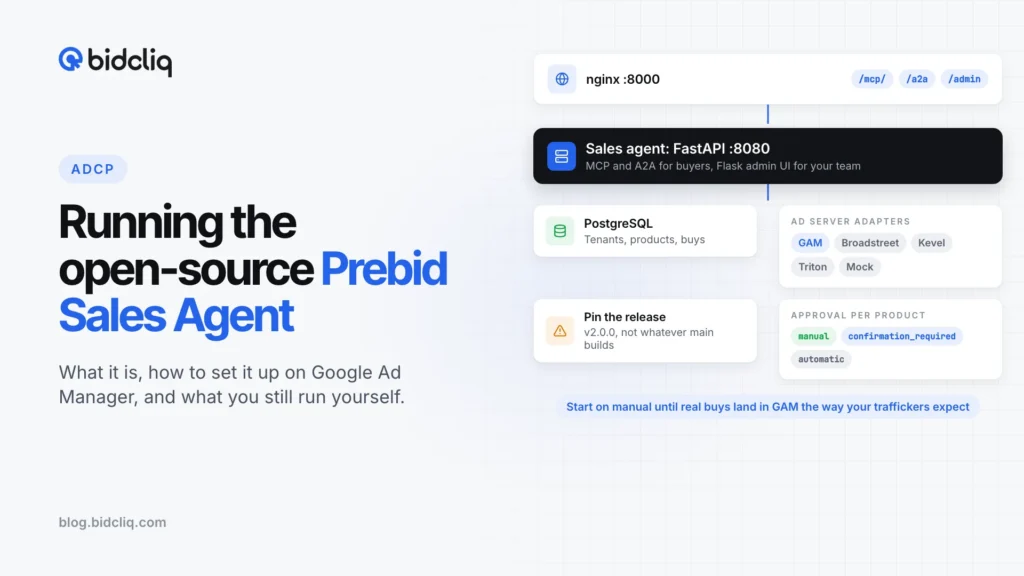
Both v2.0.0 and main run one process behind nginx:
| Component | What it does |
|---|---|
| nginx on port 8000 | Public entry point, proxies to the app |
FastAPI app on port 8080 (src/app.py) | Serves every protocol from one process |
MCP server at /mcp/ | FastMCP, the main buyer interface |
A2A server at /a2a | JSON-RPC 2.0, agent card at /.well-known/agent-card.json |
Admin UI at /admin | Flask app mounted inside FastAPI |
| PostgreSQL | All state, scoped per tenant (Compose uses postgres:17-alpine) |
| Ad server adapters | gam, broadstreet, kevel, triton, mock |
Main also exposes a REST API under /api/v1/ and routes all three buyer transports through one boundary function. That is where identity, version negotiation and idempotency are handled.
The data model is multi-tenant. A tenant is a publisher. A principal is an advertiser or buyer, identified by an API token stored as a hash and shown once. Products, media buys, creatives and audit logs all belong to a tenant. Single-tenant mode, one publisher per deployment with path routing, is the default.
What do you need before you start?
- Docker and Docker Compose, or a container platform. The repo has walkthroughs for Fly.io and Google Cloud Run, and main adds AWS (ECS Fargate, RDS, Terraform) and a single VM with Caddy.
- PostgreSQL. Compose bundles it; cloud deployments need their own.
ENCRYPTION_KEY, a Fernet key for stored secrets.- An OAuth or OIDC provider for admin login: Google, Microsoft or custom OIDC.
- A GAM network with API access turned on, and a service account.
- A domain with HTTPS for the agent.
- Optionally, a Gemini API key, for AI features such as product suggestions and creative review.
How do you set it up?
- Start it pinned. Clone the repo, check out
v2.0.0, copy.env.templateto.env, rundocker compose up -d, thencurl http://localhost:8000/health. Migrations run on startup. - First login. v2.0.0 starts the default tenant in Setup Mode with test credentials (
test_super_admin@example.com/test123). Main removed password login: setGOOGLE_CLIENT_ID,GOOGLE_CLIENT_SECRETandSUPER_ADMIN_EMAILSfirst. - Lock down access. In Users & Access, configure SSO, add your email or domain, click Test Connection, then Disable Setup Mode.
- Try the mock adapter.
CREATE_DEMO_TENANT=truecreates a demo tenant on the mock adapter with sample products. Use it locally only. A buy whose name includes[APPROVE],[REJECT:reason]or[ASK:field]follows that path, so you can test approvals without spending anything. - Connect GAM. Pick Google Ad Manager as the tenant’s adapter. Either let the agent create a service account in its GCP project (needs
GCP_PROJECT_IDand IAM rights) or upload your own JSON key. In GAM, under Admin > Global settings, turn on API access, add the service account email as an API user with the Trafficker role, and optionally restrict it with Teams. Then Test Connection and run an inventory sync. - Create products (next section), then advertisers. Each advertiser gets a token, shown once, and a mapping to its GAM advertiser ID.
- Set your domain. Point DNS at the deployment, set Custom Domain in the admin UI, and add it to your OAuth redirect URIs.
- Test as a buyer.
uvx adcp https://your-agent/mcp/ --auth <token> get_products '{"brief":"video"}'shows you the catalogue the way an agent sees it.
How do you configure products and approvals?
A product is what you sell, mapped to a GAM line item template. Create it in the admin UI with name, description, pricing, delivery type and formats. The docs list CPM, vCPM, CPC and flat rate pricing.
The agent then generates a default GAM configuration, stored on the product as implementation_config. For a guaranteed product the defaults include:
{
  "cost_type": "CPM",
  "line_item_type": "STANDARD",
  "priority": 6,
  "primary_goal_type": "DAILY",
  "delivery_rate_type": "EVENLY",
  "creative_rotation_type": "EVEN",
  "non_guaranteed_automation": "manual",
  "include_descendants": true
}
Non-guaranteed products default to PRICE_PRIORITY at priority 10, with no daily goal and AS_FAST_AS_POSSIBLE delivery. Open Configure GAM Adapter on the product to pick ad units or placements, set priority (1 to 16), frequency caps and creative placeholders.
Three rules from the GAM docs to remember:
- Line item type follows pricing unless you set it. Flat rate becomes SPONSORSHIP billed per day, vCPM becomes STANDARD (the only type on which GAM supports vCPM), other guaranteed buys become STANDARD, and everything else PRICE_PRIORITY.
- Validation is light. It checks priority and creative placeholder sizes. Leave inventory targeting empty and the adapter only logs a warning, then targets the network root ad unit.
- Approval is per product.
non_guaranteed_automationtakesautomatic(activates at once),confirmation_required(a person approves, then it activates) ormanual(a person handles every step). Despite the name, it applies to guaranteed products too, which default tomanual. Non-guaranteed products default toconfirmation_required.
Keep everything on manual or confirmation_required until you have watched real buys land in GAM the way your traffickers expect.
What do you still have to build or operate?
The software handles the protocol and the GAM booking. These stay with you:
- Hosting and upgrades. TLS, backups (
pg_dumpis in the docs), monitoring of/health, and testing every upgrade. The README warns that releases can carry breaking changes. - Secrets. Keep
ENCRYPTION_KEYsafe. SetFLASK_SECRET_KEYexplicitly, or it is regenerated at startup and sessions don’t survive restarts. Change the database password from the Compose default,secure_password_change_me. - Buyer onboarding. There is no marketplace. You create each advertiser, map it to GAM, hand over the URL and token, and rotate tokens.
- adagents.json on your domains. Buyers check that your publisher domains authorise the agent’s exact endpoint URLs. The spec also says publishers MUST pin
signing_keysfor agents allowed to run mutating tasks. See our adagents.json guide. - Signing keys. v2.0.0 ships no RFC 9421 signing code and publishes no JWKS. Main adds request and webhook signing with brand.json and JWKS discovery, but it is unreleased, so with v2.0.0 you have no agent key to pin.
- People in the loop. Someone has to approve buys and review creatives in the admin UI, at the speed buyers expect.
- Reporting checks. Compare
get_media_buy_deliverywith GAM reports for the same buy before money depends on it. - Other ad servers. Broadstreet, Kevel and Triton are at earlier stages than GAM. Anything else needs a new adapter written against
src/adapters/base.py.
Checklist
- Decide whether to run v2.0.0 (AdCP 3.1.0-beta.3) or main (AdCP 3.1.1, unreleased), and write the decision down.
- Deploy from a pinned tag or image, never
latest. - Configure SSO, disable Setup Mode, set every secret, change default passwords.
- Test the whole flow on the mock adapter, including rejections and approvals.
- Connect GAM with a service account on the Trafficker role, restricted by Teams.
- Write a short product list, set inventory targeting on every product, and start with manual approval.
- Publish adagents.json on every domain the agent sells, listing the exact MCP and A2A URLs.
- Run a test buy end to end and reconcile delivery against GAM.
At BidCliq we run a sales agent that AgenticAdvertising.org has verified against AdCP 3.1. Whichever agent you use, the product list and GAM cleanup carry over. For how the standards compare, see AAMP vs AdCP.
Frequently asked questions
Which AdCP version does the Prebid Sales Agent support?
The v2.0.0 release pins the adcp 5.7.0 Python SDK, which targets AdCP 3.1.0-beta.3. The unreleased main branch pins adcp 6.6.0 and targets AdCP 3.1.1. Neither implements AdCP 3.2, the current stable line.
Which ad servers does it work with?
Google Ad Manager is the most developed adapter. The repo also ships adapters for Broadstreet, Kevel and Triton Digital at earlier stages, and a mock adapter that spends nothing.
What infrastructure does it need?
A container runtime, PostgreSQL, an encryption key for stored secrets, an OAuth or OIDC provider for the admin UI, and HTTPS on your own domain. A Gemini API key is optional for AI features.
Can a buyer agent book a campaign without anyone approving it?
Only if you set a product to automatic. The GAM product defaults are manual for guaranteed products and confirmation_required for non-guaranteed ones.
Is the Prebid Sales Agent production-ready?
Its README calls it alpha, says v2.0.0 introduced breaking changes, and tells you to pin a version and validate before relying on it. Treat a deployment as a controlled pilot.
About the author
Founder, BidCliq
Sharad Yadav is the founder of BidCliq, a publisher-first ad monetization platform that helps publishers and ad ops teams run header bidding, Prebid and programmatic across display, video, app and CTV. Before BidCliq, he led AdTech and product at GeeksforGeeks, where he built an in-house ads product that doubled programmatic revenue within nine months and an anti-adblock solution that lifted ad yield by 10%. He is a founding member of AdCP.